No, But Why? - Multi-Vendor OSPF Lab with Containerlab (VyOS + FRR)
Build a real multi-vendor OSPF lab with Containerlab: two VyOS routers and two FRR routers in a ring, one OSPF area, plus a link-failure demo.
Published: Sunday, October 11th, 2026
Build a real multi-vendor OSPF lab with Containerlab: two VyOS routers and two FRR routers in a ring, one OSPF area, plus a link-failure demo.
Published: Sunday, October 11th, 2026
This tutorial builds a working multi-vendor OSPF network in about fifteen minutes: two VyOS routers and two FRRouting routers wired in a ring, running a single OSPF area, with two Linux hosts passing traffic across it — one behind a VyOS router, one behind an FRR router, so the host-to-host path crosses a vendor boundary. Along the way we'll see what a cross-vendor MTU mismatch does to OSPF (and why the setup pins the MTU up front), then deliberately break a core link to watch OSPF reroute around the damage.
A few years back I wrote a tutorial that converged three Cisco routers with OSPF inside GNS3 (it's still here). It works, but it asks a lot of the reader: install GNS3, find a Cisco IOS image (good luck with the licensing), and learn a GUI. This tutorial is its spiritual successor — same goal, fewer things that can go wrong before you begin.
Containerlab turns network topologies into a single YAML file. Each node is a container, links are virtual cables, and containerlab deploy builds the whole thing. No GUI, no image hunting for the routing software itself.
The vendors are the interesting part. VyOS is a real, open-source network OS with a Junos-style CLI — the same configuration hierarchy and operational commands you'd meet on Juniper gear. FRRouting (FRR) is the open-source routing suite that powers a remarkable amount of real infrastructure, speaking Cisco-style commands through vtysh. Running OSPF between them proves the point that matters: OSPF is OSPF. The protocol doesn't care whose logo is on the box, and this lab makes you believe it because you'll watch the two CLIs agree with each other.
You need a Linux machine (bare metal or a VM — nested virtualization works, but give it real cores) with:
/dev/kvm must exist. The VyOS nodes are full virtual machines in containers; without hardware virtualization they won't boot.$ bash -c "$(curl -sL https://get.containerlab.dev)"
$ containerlab versionTwo container images:
quay.io/frrouting/frr:10.7.1. Note the registry: the frrouting/frr repository on Docker Hub is stale (v8.x at last check). The project's official images live on Quay.$ bsdtar -xf vyos-1.5-stream.iso live/filesystem.squashfs
$ sqfs2tar live/filesystem.squashfs > rootfs.tar
$ docker build -t vyos-local:1.5-stream-2025-Q2 .That needs squashfs-tools-ng and libarchive-tools on the build host. The Dockerfile is three meaningful lines — unpack the root filesystem onto scratch, mask a couple of services that make no sense in a container, and boot systemd:
FROM scratch
ADD rootfs.tar /
RUN for service in getty.target auditd.service; do systemctl mask $service; done
HEALTHCHECK --start-period=10s CMD systemctl is-system-running
CMD ["/sbin/init"]Four routers in a ring — vyos-1 and vyos-2 on one side, frr-1 and frr-2 on the other — with one Linux host hanging off vyos-1 and the other off frr-2. That placement is deliberate: the path between the hosts has to cross from VyOS to FRR, which is the whole point of a multi-vendor lab.
Every router-to-router link is a /30, every router has a /32 loopback that doubles as its OSPF router-id, and everything lives in OSPF area 0:
| Link | Subnet | Endpoints |
|---|---|---|
| vyos-1 ↔ frr-1 | 10.0.12.0/30 | vyos-1:eth1 .1 / frr-1:eth1 .2 |
| frr-1 ↔ frr-2 | 10.0.23.0/30 | frr-1:eth2 .1 / frr-2:eth1 .2 |
| frr-2 ↔ vyos-2 | 10.0.34.0/30 | frr-2:eth2 .1 / vyos-2:eth1 .2 |
| vyos-2 ↔ vyos-1 | 10.0.41.0/30 | vyos-2:eth2 .1 / vyos-1:eth2 .2 |
| vyos-1 LAN | 192.168.10.0/24 | vyos-1:eth3 .1 / host-1 .10 |
| frr-2 LAN | 192.168.20.0/24 | frr-2:eth3 .1 / host-2 .10 |
Loopbacks: vyos-1 10.255.0.1, vyos-2 10.255.0.2, frr-1 10.255.0.3, frr-2 10.255.0.4.
The ring is deliberate: every router has two disjoint paths to every other router. That redundancy is what the failure demo at the end will exercise.
Everything lives in one directory. The topology file wires the nodes, pins the MTU on every link, and hands each router its config:
Why the MTU pin matters: the FRR container image brings its interfaces up at MTU 9500, while VyOS uses 1500. OSPF neighbors will not form an adjacency when their MTUs disagree — they get stuck in ExStart and never come out. Setting mtu: 1500 on each virtual cable makes both ends agree before anything boots, so the problem never appears. (There is a demonstration later showing exactly what the broken version looks like, so you can see what this setting is protecting you from.)
# vyos-frr-ospf.clab.yml
name: vyos-frr-ospf

topology:
  kinds:
    vyosnetworks_vyos:
      image: vyos-local:1.5-stream-2025-Q2
  nodes:
    vyos-1:
      kind: vyosnetworks_vyos
      startup-config: configs/vyos-1.boot
    vyos-2:
      kind: vyosnetworks_vyos
      startup-config: configs/vyos-2.boot
    frr-1:
      kind: linux
      image: quay.io/frrouting/frr:10.7.1
      binds:
        - configs/frr-1/daemons:/etc/frr/daemons
        - configs/frr-1/frr.conf:/etc/frr/frr.conf
    frr-2:
      kind: linux
      image: quay.io/frrouting/frr:10.7.1
      binds:
        - configs/frr-2/daemons:/etc/frr/daemons
        - configs/frr-2/frr.conf:/etc/frr/frr.conf
    host-1:
      kind: linux
      image: nicolaka/netshoot:latest
      exec:
        - ip addr add 192.168.10.10/24 dev eth1
        - ip route replace default via 192.168.10.1
    host-2:
      kind: linux
      image: nicolaka/netshoot:latest
      exec:
        - ip addr add 192.168.20.10/24 dev eth1
        - ip route replace default via 192.168.20.1
  links:
    - endpoints: ["vyos-1:eth1", "frr-1:eth1"]
      mtu: 1500
    - endpoints: ["frr-1:eth2", "frr-2:eth1"]
      mtu: 1500
    - endpoints: ["frr-2:eth2", "vyos-2:eth1"]
      mtu: 1500
    - endpoints: ["vyos-2:eth2", "vyos-1:eth2"]
      mtu: 1500
    - endpoints: ["vyos-1:eth3", "host-1:eth1"]
      mtu: 1500
    - endpoints: ["frr-2:eth3", "host-2:eth1"]
      mtu: 1500
FRR configures OSPF the way you'd expect if you've touched Cisco gear — interface addresses plus ip ospf area 0, and a router-id. Here's configs/frr-1/frr.conf in full. frr-2 is the same shape with its own addresses — eth1 10.0.23.2/30 toward frr-1, eth2 10.0.34.1/30 toward vyos-2, router-id 10.255.0.4 — plus one extra interface the others don't have: eth3, 192.168.20.1/24 in area 0, facing host-2:
frr version 10.7.1
frr defaults traditional
hostname frr-1
!
interface eth1
 description to vyos-1
 ip address 10.0.12.2/30
 ip ospf area 0
!
interface eth2
 description to frr-2
 ip address 10.0.23.1/30
 ip ospf area 0
 ip ospf cost 100
!
interface lo
 ip address 10.255.0.3/32
 ip ospf area 0
!
router ospf
 ospf router-id 10.255.0.3
!
Alongside it, configs/frr-1/daemons enables the daemons we need (zebra=yes, ospfd=yes, staticd=yes, everything else no).
One line in that config deserves a callout: ip ospf cost 100 on the frr-1↔frr-2 link (mirrored on frr-2's side). Without it, OSPF sees two equal-cost paths between the hosts — one via each side of the ring — and the tiebreak flips every time the topology reconverges. The cost of 100 makes the vyos-2 side the deterministic path for host traffic, which is what the failure demo later depends on.
VyOS does the same thing in its own idiom — a configuration hierarchy instead of per-interface commands. Here's the interesting part of configs/vyos-1.boot (vyos-2 is the same on eth1/eth2 and the loopback with .2 addresses, but has no LAN interface — host-2 moved to frr-2; the file also carries the admin user and a vyos-config-version footer, both copied from a generated default config):
interfaces {
    ethernet eth1 {
        address "10.0.12.1/30"
        description "to frr-1"
    }
    ethernet eth2 {
        address "10.0.41.2/30"
        description "to vyos-2"
    }
    ethernet eth3 {
        address "192.168.10.1/24"
        description "to host-1 (LAN)"
    }
    loopback lo {
        address "10.255.0.1/32"
    }
}
protocols {
    ospf {
        area 0 {
            network "10.0.0.0/8"
            network "192.168.10.0/24"
        }
        parameters {
            router-id "10.255.0.1"
        }
    }
}
Read these now, because you'll be reading their show output for the rest of this tutorial.
With the files in place:
$ sudo containerlab deploy -t vyos-frr-ospf.clab.ymlContainerlab pulls the images, creates six containers, and wires the virtual cables. Then wait: the VyOS nodes take two to three minutes to reach healthy on first boot. They're full VMs initializing a real OS, not lightweight processes. FRR and the hosts are up in seconds. sudo containerlab inspect -t vyos-frr-ospf.clab.yml shows the table; you're ready when both VyOS nodes report (healthy).
Shell access for the rest of the tutorial:
$ sudo docker exec -it clab-vyos-frr-ospf-frr-1 vtysh      # FRR CLI
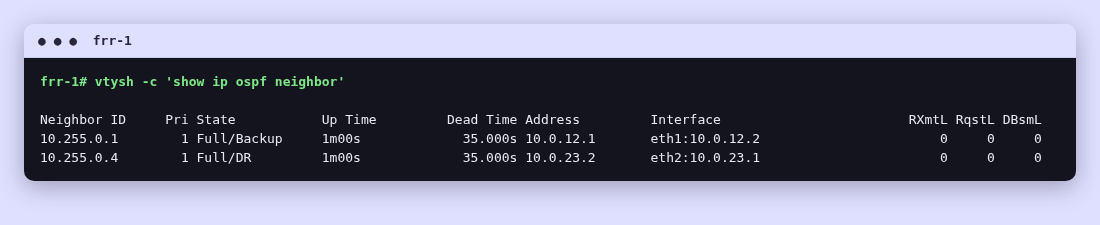
$ sudo docker exec -it clab-vyos-frr-ospf-vyos-1 su - admin # VyOS CLIFirst, the FRR side. show ip ospf neighbor should show both adjacencies Full — one toward vyos-1, one toward frr-2:
Now the same question in VyOS's dialect. The command is identical — show ip ospf neighbor — but you're asking a different operating system:
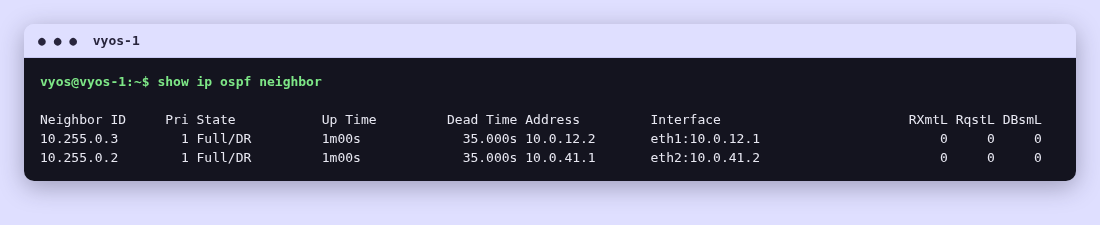
Two vendors, same protocol, same answer. The loopbacks (10.255.0.1–.4) are the router-ids, so you can read straight off which neighbor is which.
End to end: from host-1, ping host-2 across the ring:
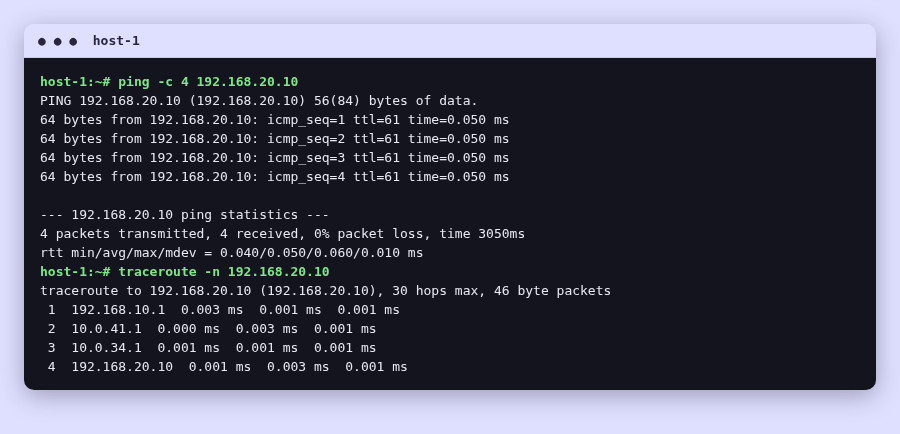
Four replies, zero loss. And look at the path the traceroute shows: host-1 → vyos-1 → vyos-2 → frr-2 → host-2. That ping crossed from VyOS into FRR — two vendors passing traffic for each other, which is the entire point of this lab.
This really happened while building this lab — my first deploy didn't have the MTU pin yet. I'm keeping it here as a demonstration: it's the kind of bug that eats an afternoon if you've never seen it, and it shows exactly what the mtu: 1500 setting in the topology file prevents.
Without the pin, the same-vendor links come up just fine. But the two cross-vendor links — vyos-1↔frr-1 and vyos-2↔frr-2 — will not form adjacencies. On the VyOS side, the neighbor sits there like this:
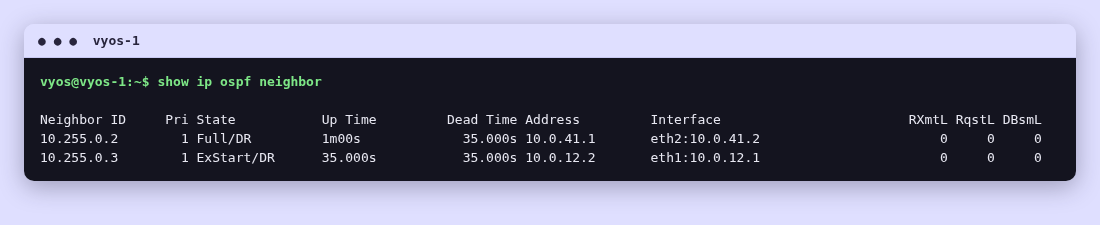
ExStart, forever, while the other neighbor sits at Full. If you've run OSPF for a while, you'll recognize that state: the two routers are stuck exchanging database description packets and never getting anywhere. The common causes are MTU mismatch, duplicate router-ids, or a firewall rule blocking unicast. The router-ids were unique. No firewall rules in a lab. So: MTU.
$ sudo docker exec clab-vyos-frr-ospf-frr-1 ip link show eth1 | grep -o 'mtu [0-9]*'
mtu 9500
There it is. The FRR container image brings its data interfaces up at MTU 9500; VyOS uses 1500. During the DBD exchange, FRR advertises a larger MTU than VyOS's interface can handle, and per RFC 2328 the neighbor drops back to ExStart — on every attempt, forever. The same-vendor links were fine because both ends agreed with each other; only the mixed links broke, which is exactly why it looked so confusing at first.
The fix is the one line per link already in your topology file:
    - endpoints: ["vyos-1:eth1", "frr-1:eth1"]
      mtu: 1500
Containerlab sets the MTU on the virtual cable itself, so both ends inherit it. With that pin in place, all eight adjacencies go Full — which is what you saw in the verification section above. In production you'd fix this with ip ospf mtu-ignore or by standardizing the MTU across your equipment; in a lab, pinning it in the topology is the straightforward fix, and the topology file now documents the requirement.
The ring earns its keep now — and this demo is stronger than it looks, because the link we're about to break is the one carrying the host traffic. Kill the vyos-2↔frr-2 link from inside the frr-2 container:
$ sudo docker exec clab-vyos-frr-ospf-frr-2 ip link set eth2 downOSPF notices within seconds — the interface going down is an immediate event, no waiting on dead timers. frr-2 drops to a single neighbor, and its route to host-1's LAN (192.168.10.0/24) reroutes the long way around the ring, via frr-1:
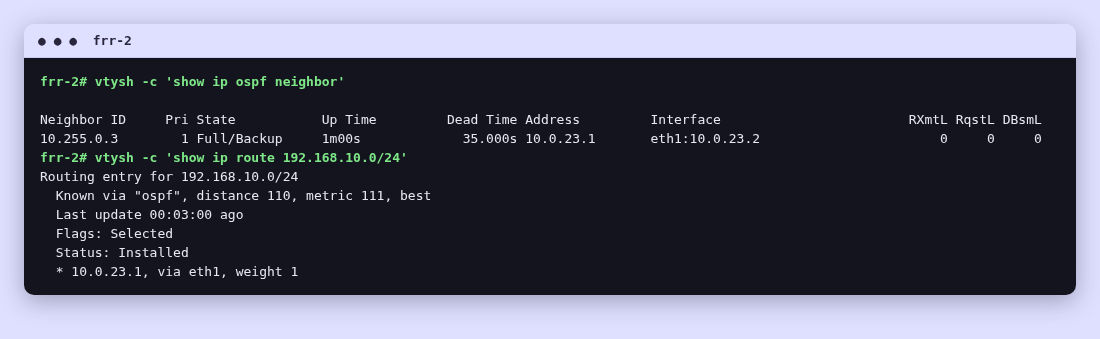
Keep a ping running from host-1 to host-2 through the whole thing. You'll lose a ping or two while OSPF reconverges — the path your traffic was using just disappeared, so a brief gap is honest — and then it's clean again, now traveling host-1 → vyos-1 → frr-1 → frr-2 → host-2. The failover crossed vendor boundaries in both directions and the application never had to care.
Bring the link back:
$ sudo docker exec clab-vyos-frr-ospf-frr-2 ip link set eth2 upThe adjacency reforms and returns to Full in about forty seconds on default OSPF timers, and the route flips back to the direct path. That's the whole point of the ring: no single link failure should matter, and now you've watched it not matter — on traffic that was actually using the broken link.
$ sudo containerlab destroy -t vyos-frr-ospf.clab.yml --cleanupEverything — containers, virtual cables, the lot — is gone. The lab is a YAML file and four configs; redeploying takes one command whenever you want it back.
What I'd suggest next: change something. Add a fifth router. Drop a router out of the ring and re-run the failure demo. Move one link into OSPF area 1 and watch what changes. The lab is cheap to rebuild, so the cost of curiosity is about three minutes.
Tested with Containerlab 0.81.0, FRRouting 10.7.1, VyOS 1.5-stream (2025-Q2), Docker 29.7.2.